

A lightweight gold income and expense tracker for World of Warcraft.

Speak murloc. What you type goes out as Nerglish gurgle; anyone else running the addon reads it back in plain English, and everyone else just hears a murloc.


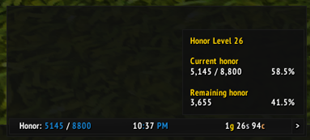
To create a data text for displaying honor using ElvUI, you would typically follow these steps in your translation, focusing on the functionality and how a gamer would use it. Here's how you could present it in Chinese: --- **ElvUI荣誉数据显示文本设置指南:** 1. 打开ElvUI配置界面。 2. 进入“数据文本”或“插件”选项卡。 3. 选择“新建”,然后选

DBM首领警报主模块,包含当前版本的副本,不包含老团本和五人副本,需要的可以单独下载其他资料片的模块。
DBM首领警报主模块,包含当前版本的副本,不包含老团本和五人副本,需要的可以单独下载其他资料片的模块。
DBM首领警报主模块,包含当前版本的团队副本,不包含老团本和五人副本,需要的可以单独下载其他资料片的模块。
全面战斗分析,汇聚伤害、治疗等关键数据。
怀旧专用版本,正式服请勿下载!
Quickly see who rolled on a chest and who won, see who else need before rolling on an item for off spec
Quickly see who rolled on a chest and who won, see who else need before rolling on an item for off spec
Quickly see who rolled on a chest and who won, see who else need before rolling on an item for off spec
Per-computer action bar profiles for WoW Classic Era/Hardcore — stops Blizzard's account sync from overwriting your bar layout every time you log in on a different machine.
Show Class Icons, Totem Icons and Arena ID/Spec on Nameplates. Works with all addons.
