

PhoenixStyle强大的RL辅助工具,具备非常详细完整的战斗分析功能,帮你找出raid中出现的错误和责任人员。


(显示你角色上控制技能效果的持续时间。) This WeakAura provides an easy-to-read visual indication of the remaining time on crowd control effects applied to your character, allowing for better management of your cooldowns and escape mechanics. (此WeakAura以易于阅读的视觉形式显示应用于你角色的群体控制效果的剩余时间,帮助你更好地管理冷却时间和逃脱机制。) Key features

Midnight 插件为玩家提供了主要和次要资源条的显示功能,适用于不同职业。它能清晰展示角色当前资源状况,帮助玩家更好地管理技能施放和资源分配。
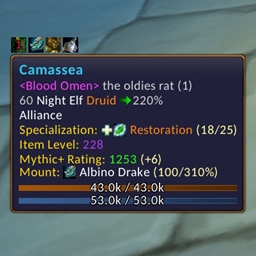
一款高级提示工具插件 功能:提供更详细的目标信息,增强游戏内物品和技能的提示效果。 使用:安装后,鼠标悬停在游戏内的物品或技能上即可查看增强的提示信息。

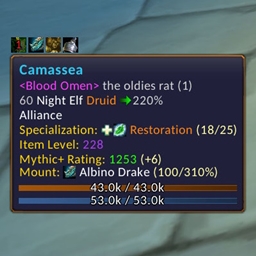
一款高级提示工具插件 功能:此插件能够为游戏内的物品、技能等提供更详细的高级提示信息。 使用方法:安装后,鼠标悬停在目标上即可查看增强的提示信息。

DBM首领警报主模块,包含当前版本的副本,不包含老团本和五人副本,需要的可以单独下载其他资料片的模块。
DBM首领警报主模块,包含当前版本的副本,不包含老团本和五人副本,需要的可以单独下载其他资料片的模块。
DBM首领警报主模块,包含当前版本的团队副本,不包含老团本和五人副本,需要的可以单独下载其他资料片的模块。
全面战斗分析,汇聚伤害、治疗等关键数据。
怀旧专用版本,正式服请勿下载!
Passive player recorder for WoW — Forever, Classic Era and Retail — feeding the RealmPulse realm demographics site
Passive player recorder for WoW — Forever, Classic Era and Retail — feeding the RealmPulse realm demographics site
Passive player recorder for WoW — Forever, Classic Era and Retail — feeding the RealmPulse realm demographics site
Remember players you have grouped with, rate your experiences, and recognize familiar players in Group Finder and tooltips.
Hover a macro and press a shortcut to open its editor. Hover another and press again to switch; edits save automatically, with no Save click needed. Use Arena 1/2/3 buttons (in macro editor) for quick target changes. Type /hm for settings and shortcuts.
