178魔兽世界
全部插件
副本战斗
BigWigs
DBM
聊天社交
任务升级
职业
恶魔猎手
术士
圣骑士
死亡骑士
牧师
武僧
潜行者
萨满
猎人
战士
法师
德鲁伊
唤魔师
Twitch整合
单位框架
头像
姓名板
团队框架
HUD
背包&银行
宠物&座骑
宠物对战
音频&特效
插件运行库
开发工具
拍卖&商业
邮件
专业
附魔
草药学
铭文学
急救
工程学
钓鱼
考古学
采矿
制皮
锻造
剥皮
炼金术
烹饪
珠宝学
裁缝
其他
地图
Atlas
HandyNotes
要塞
增益&减益
辅助组件
FuBar信息条
Titan信息条
Data Broker信息条
信息提示
美化
Masque
小游戏
角色&幻化
幻化
公会
动作条
PvP
战场
竞技场
数据导出
战斗
伤害输出
坦克
施法者
治疗者
成就
整合界面
排序:
评分
更新
评分
推荐
下载
上一页
2207
2208
2209
2210
2211
2212
2213
....
2348
下一页
ChiBar
225,632
2025/08/05
329.6
772
ChiBar是一款简单的插件,它为武僧提供了一个可以观察气量的框架。
下载
AdiBags - Baubleworm Junk
1,721
2022/11/01
329.6
994
为AdiBags添加筛选器,用于识别在奥利波斯购买宝珠虫所需的垃圾物品。
下载
[经典旧世]Soulpact_Loot_Priority
1,896
2023/12/28
329.6
451
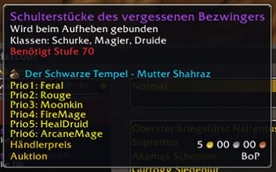
内部公会优先列表作为鼠标提示信息
下载
[怀旧服]Soulpact_Loot_Priority
1,896
2023/12/28
329.6
451
内部公会优先列表作为鼠标提示信息
下载
Soulpact_Loot_Priority
1,896
2023/11/03
329.6
451
内部公会优先列表作为鼠标提示信息
下载
[经典旧世]SpartanUI: Animated
112,295
2026/06/03
329.6
703
使Spartan UI的状态栏纹理动起来
下载
[怀旧服]SpartanUI: Animated
112,295
2026/06/03
329.6
445
使Spartan UI的状态栏纹理动态化。
下载
[经典旧世]DRList-1.0 (Diminishing Returns Data)
148,851
2026/02/24
329.5
568
用于显示群体控制递减回报数据的库。
下载
[怀旧服]DRList-1.0 (Diminishing Returns Data)
148,851
2026/02/24
329.5
589
用于显示群体控制递减回报数据的库。
下载
DRList-1.0 (Diminishing Returns Data)
148,851
2026/02/24
329.5
589
用于显示群体控制递减回报数据的库。
下载
上一页
2207
2208
2209
2210
2211
2212
2213
....
2348
下一页
下载排行榜
MORE
1
[怀旧服] DBM:首领警报
DBM首领警报主模块,包含当前版本的副本,不包含老团本和五人副本,需要的可以单独下载其他资料片的模块。
615,378,730
2
[经典旧世] DBM:首领警报
DBM首领警报主模块,包含当前版本的副本,不包含老团本和五人副本,需要的可以单独下载其他资料片的模块。
615,378,730
3
Deadly Boss Mods (DBM):首领警报核心
DBM首领警报主模块,包含当前版本的团队副本,不包含老团本和五人副本,需要的可以单独下载其他资料片的模块。
615,378,730
4
[怀旧服] Details! 全能伤害统计
全面战斗分析,汇聚伤害、治疗等关键数据。
348,460,952
5
[经典旧世] Details! 全能伤害统计
怀旧专用版本,正式服请勿下载!
348,460,952
评分排行榜
MORE
1
TrinketMenu Plus
TrinketMenu Plus 在饰品栏两侧添加了两个可自定义的法术/宏动作栏,并内置了一个针对地面引导法术(如自然之林、星辰坠落、烈焰之雨)的辅助瞄准覆盖层。
99999.9
2
Pedro Bloodlust Custom
为Pedro Bloodlust插件添加自定义音轨功能。这个扩展允许你为嗜血/英雄意志效果设置个性化的声音提示,让你在游戏中能通过不同的音频反馈及时了解技能状态,提升游戏体验。
99999.9
3
ViwerLog
一个小插件,可以在其他角色的提示框中显示其背包内的物品和货币数量。
99999.9
4
No Help Tips
移除游戏中存在的、无法通过教程关闭的新手帮助提示。这些提示有时会在新角色登录时错误地持续显示,此插件可以强制移除这些烦人的提示框。
99999.9
5
[经典旧世]Roster Vault
这个插件允许你保存魔兽世界经典怀旧服/硬核角色的本地快照,并在玩其他角色时浏览他们的装备、属性、专业、技能、声望、经验值和金币信息。
99999.9